Skip to content
R&D COPILOTe‑Transport

[ RO e-TRANSPORT · ROAD FREIGHT · ROMANIA ]

The UIT is ready before the truck leaves.

Prepare each e‑Transport declaration from the delivery you already manage. A dispatcher fills it in, an authorised colleague reviews it, and the UIT and ANAF response stay with the delivery until it arrives.

For companies operating in Romania and the carriers that move their goods. Set up for your data sources and your authorised ANAF access.

Huedin Aleșd A · CLUJ-NAPOCA B · ORADEA
UIT · RO e‑TransportExample data

4F7K 2Q9M 8X1D 6383

Cluj-Napoca to Oradea

Valid until
Mon 12 Oct, 23:59
Load
CJ 42 RDC · 700 kg · 40 packages
Stop 04 of 5 In transit
Illustration · example data · not a live position

[ 00 · SCOPE ]

Know when a load needs a UIT.

In Romania, e‑Transport is ANAF’s system for monitoring road transport of goods. Before certain loads move, the declarant registers the transport and receives a UIT, the code that travels with the goods.

Domestic transport of high-fiscal-risk goods

≥ 2.5 t
Vehicle with a maximum technically permissible mass of at least 2.5 tonnes

AND

> 500 kg
Goods with a total gross weight above 500 kg

OR

> 10,000 lei
or a total value above 10,000 lei

The load conditions apply to at least one batch of goods on the vehicle. Gross weight includes packaging. Value excludes VAT. On Romanian territory they apply to high-fiscal-risk goods; international road transport needs a UIT for any goods under the same vehicle and load conditions, with all goods in the batch declared under one UIT. Source: OUG 41/2022 as amended and ANAF Order 1337/2024 (checked October 2026).

Example: CJ 42 RDC · 700 kg gross · 1,980 lei → over 500 kg → UIT required

Domestic, international and operation types

Domestic transport

Goods classed as high fiscal risk (by NC code), moved on Romanian roads under the conditions above.

High-fiscal-risk goods (ANAF Order 802/2022): vegetables and fruit, beverages (except excise goods moving under EMCS), natural sand and gravel, clothing, footwear, and steel bars and rods.

If a batch mixes high-risk and other goods, every item in it is declared under the same UIT.

International transport

International road transport needs a UIT for any goods under the same vehicle and load conditions, with all goods in the batch declared under one UIT: intra-community acquisitions and deliveries, imports, exports and intra-community transit through Romania.

Operation types, set up for the ones you use

  • TTN · Domestic transport
  • AIC · Intra-community acquisition
  • LIC · Intra-community delivery
  • IMP · Import
  • EXP · Export
  • DIN / DIE · Intra-community transit via storage
  • LHI / LHE · EU lohn in / out
  • SCI / SCE · Call-off stock in / out

[ THE ROUTE ]

One delivery, five stops.

Every declaration follows the same road. Each stop below is a step your team sees in R&D COPILOT, with the person responsible and the status in plain words.

[ 01 · DECLARE ]

Start from the delivery, not a blank form.

The dispatcher opens the delivery and the declaration is already filled in: consignee, goods with NC codes, gross weight, value, loading and unloading points and the declared start date.

How it works

They choose the vehicle and carrier from saved lists and fix only what is missing.

Status: Draft

At this stop

  • Fields taken from the delivery
  • Missing fields listed before review
  • Saved vehicles, carriers and goods
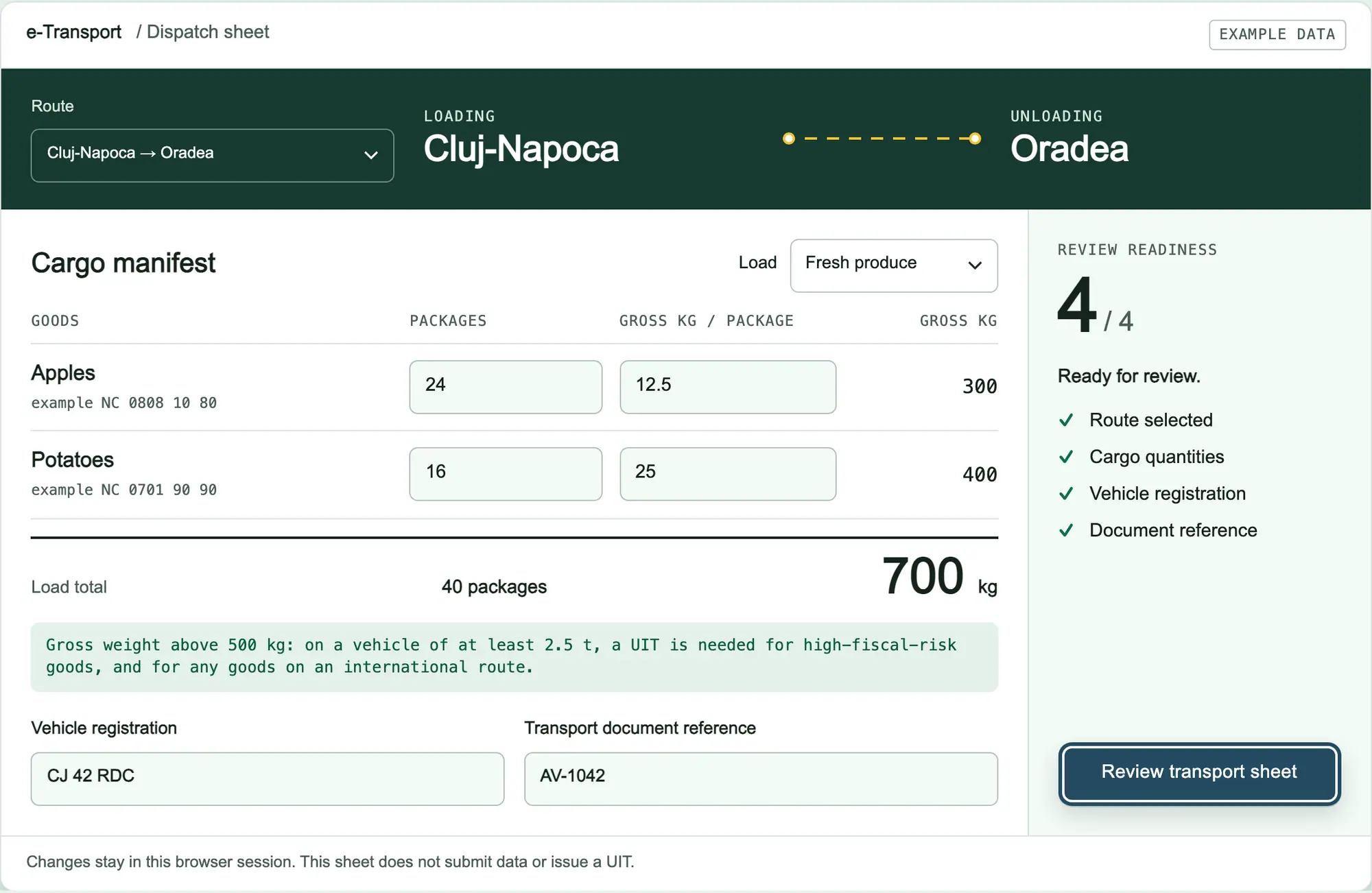
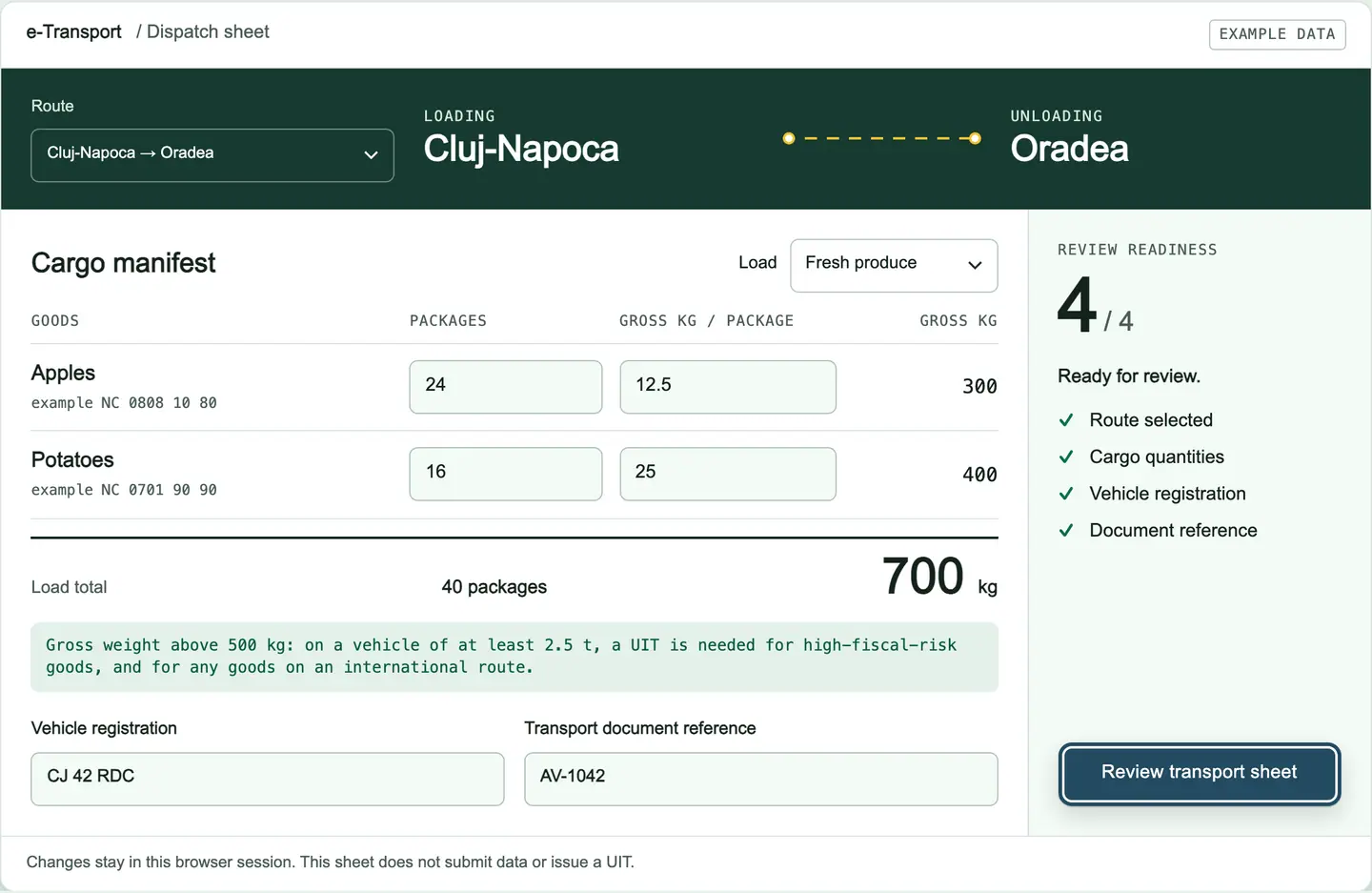
Try the dispatch sheetLive example: edit packages and weights, add a plate, open the review.
e‑Transport / Dispatch sheetExample data
LOADINGCluj-Napoca
UNLOADINGOradea

Cargo manifest

Applesexample NC 0808 10 80
300
Potatoesexample NC 0701 90 90
400
Load total40 packages700 kg

Gross weight above 500 kg: on a vehicle of at least 2.5 t, a UIT is needed for high-fiscal-risk goods, and for any goods on an international route.

Changes stay in this browser session. This sheet does not submit data or issue a UIT.

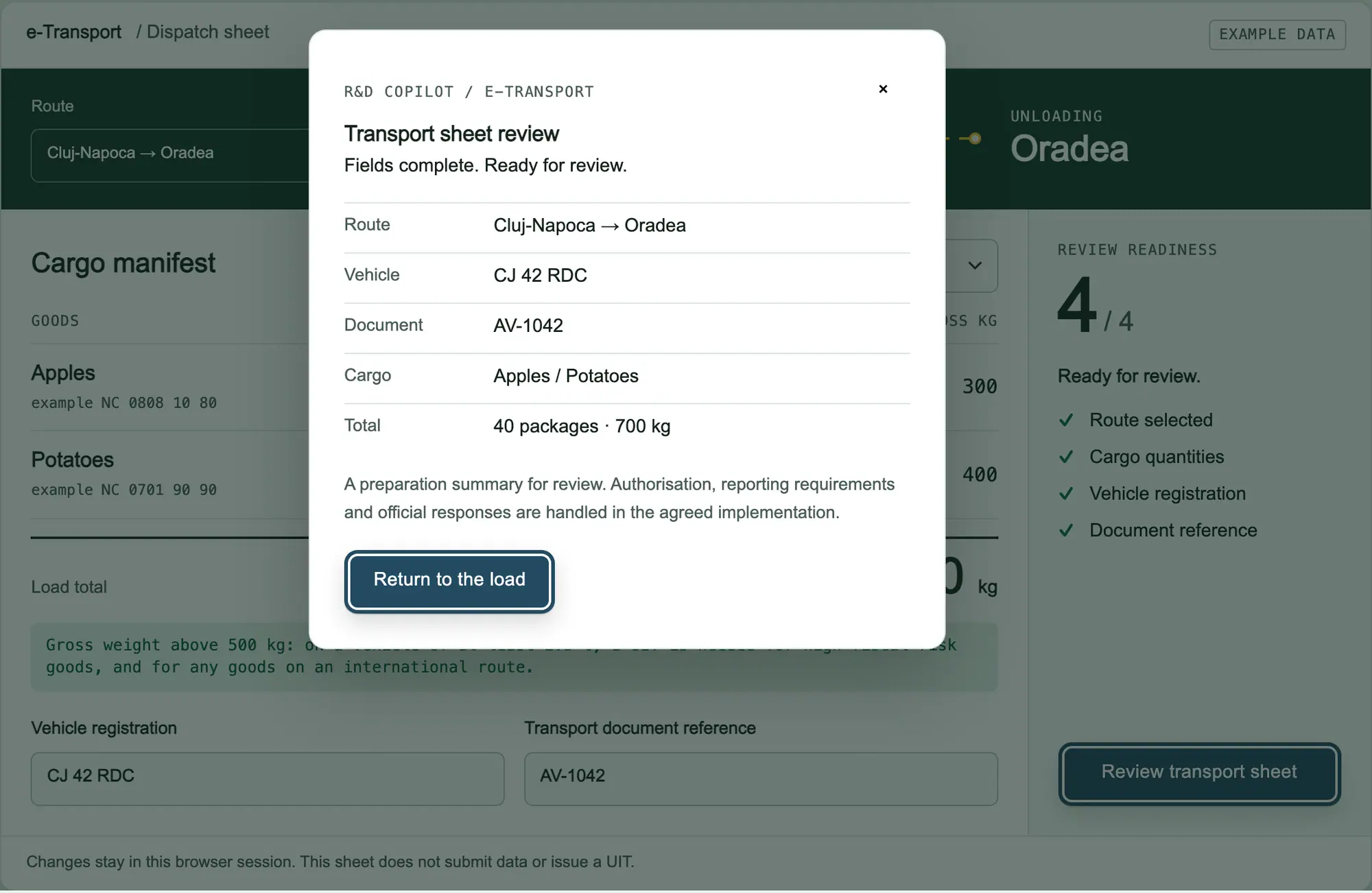
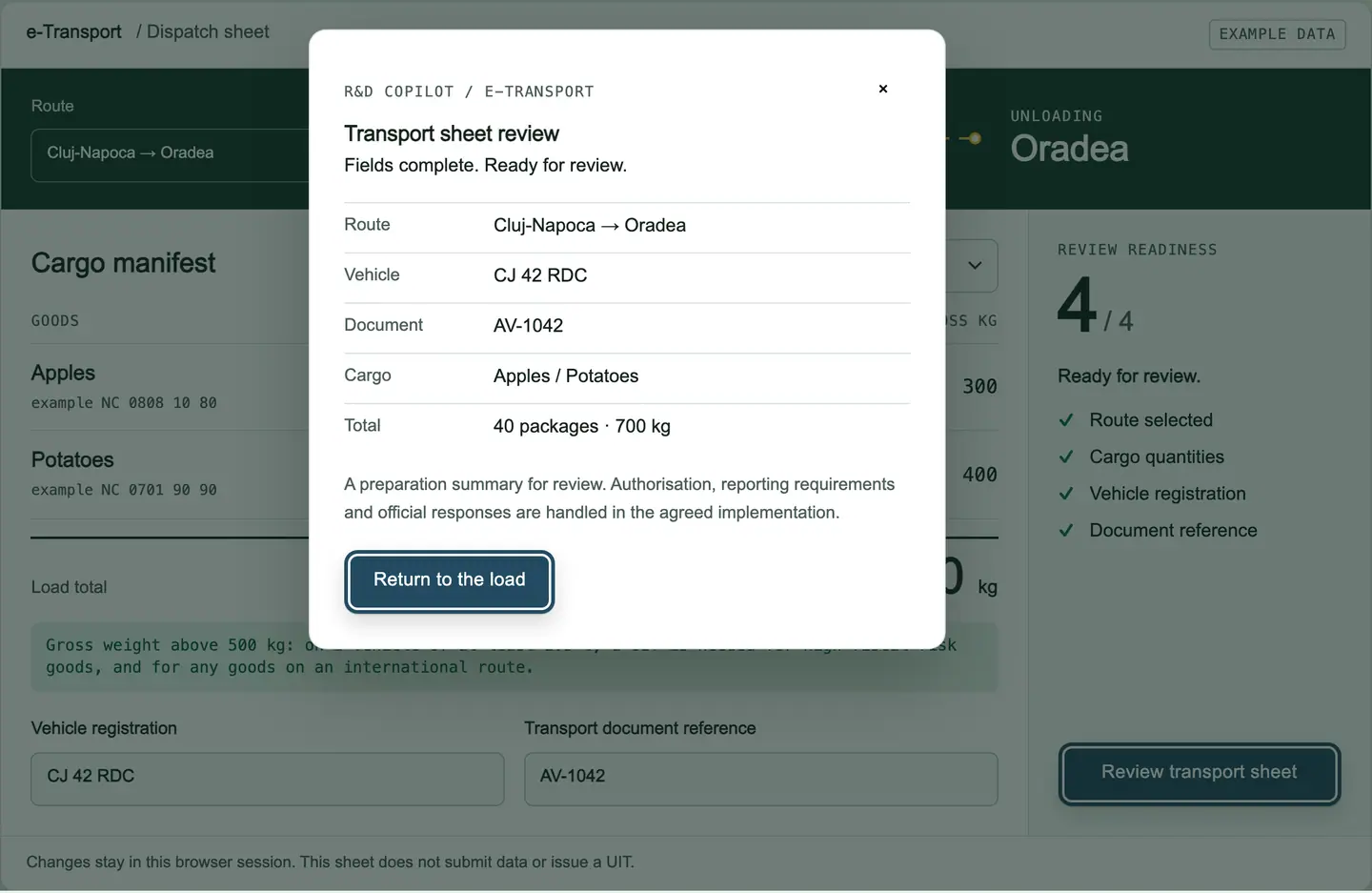
R&D COPILOT / e‑Transport

Transport sheet review

Route
Vehicle
Document
Cargo
Total

A preparation summary for review. Authorisation, reporting requirements and official responses are handled in the agreed implementation.

[ 02 · UIT ISSUED ]

An authorised colleague reviews, then the UIT comes back.

The declaration goes to the person who holds the ANAF access.

How it works

They check it, approve it and send it. The UIT and the official response are stored on the delivery, next to the person who approved it.

Status: Issued

At this stop

  • Review before sending
  • UIT stored on the delivery
  • Signed ANAF response kept with the delivery, past SPV’s 60-day download window

UIT record

Example data

4F7K2Q9M8X1D6383

Delivery
LIV-2026-01842
Operation
Domestic transport, high fiscal risk
Load
700 kg · 40 packages · 1,980 lei excl. VAT
Prepared by
Dispatcher · 07/10/2026, 08:42
Reviewed by
Authorised reviewer · 07/10/2026, 09:05
ANAF response
Accepted
Valid until
12/10/2026, 23:59 example

Corrections to this declaration go through the same review.

[ 03 · LOADING ]

The code goes to the driver with the load.

At the loading point, the dispatcher confirms that the truck is the vehicle on the declaration.

How it works

If the plate is different, the vehicle-change workflow starts before the goods leave. The UIT must reach the carrier before the truck moves, and the driver can show it printed or on a phone. We set up how it is sent: e-mail, the transport documents or your TMS.

Status: Loaded

At this stop

  • Vehicle confirmed on the delivery
  • A different plate starts a vehicle change
  • UIT to the carrier before departure
MANIFEST · LIV-2026-01842 · AV-1042Example data
Cargo manifest for delivery LIV-2026-01842
GoodsExample NCPackagesGross kgValue excl. VAT
ApplesNC 0808 10 8024 pkg300 kg1,260 lei
PotatoesNC 0701 90 9016 pkg400 kg720 lei
Total—40 pkg700 kg1,980 lei

700 kg > 500 kg → UIT required · value 1,980 lei < 10,000 lei

Vehicle
CJ 42 RDC
Trailer
—
Carrier (example)
Example Transport SRL
Loading
Cluj-Napoca
Unloading
Oradea

Vehicle confirmed08/10/2026, 06:30

[ 04 · IN TRANSIT ]

The carrier sends the position. You see the validity.

While the goods are on the road, the carrier transmits GPS position data for the UIT.

How it works

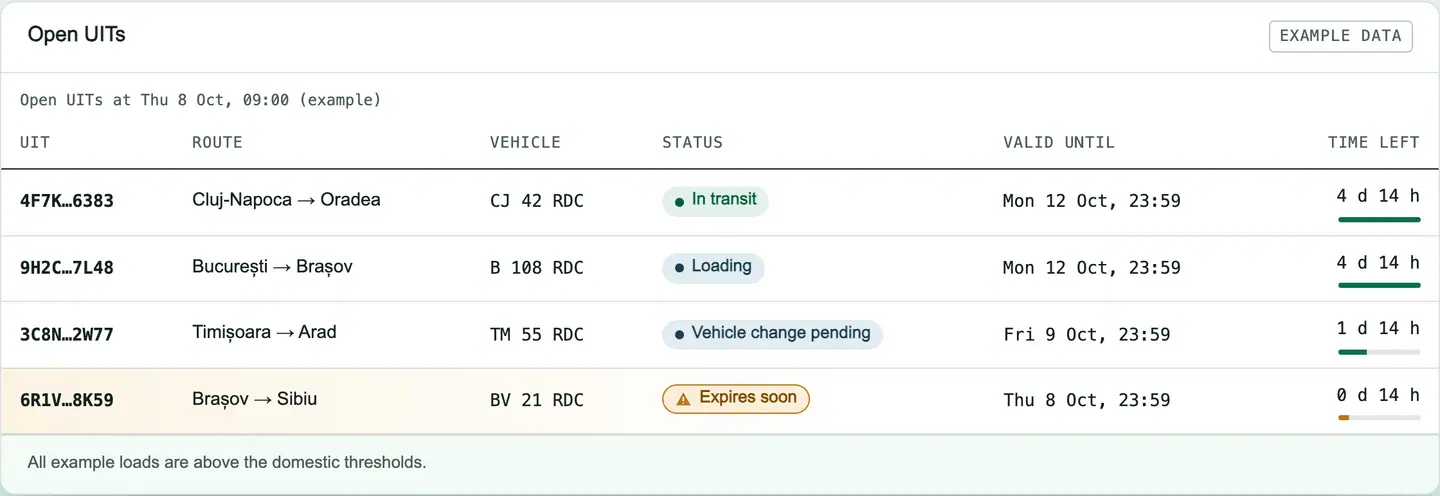
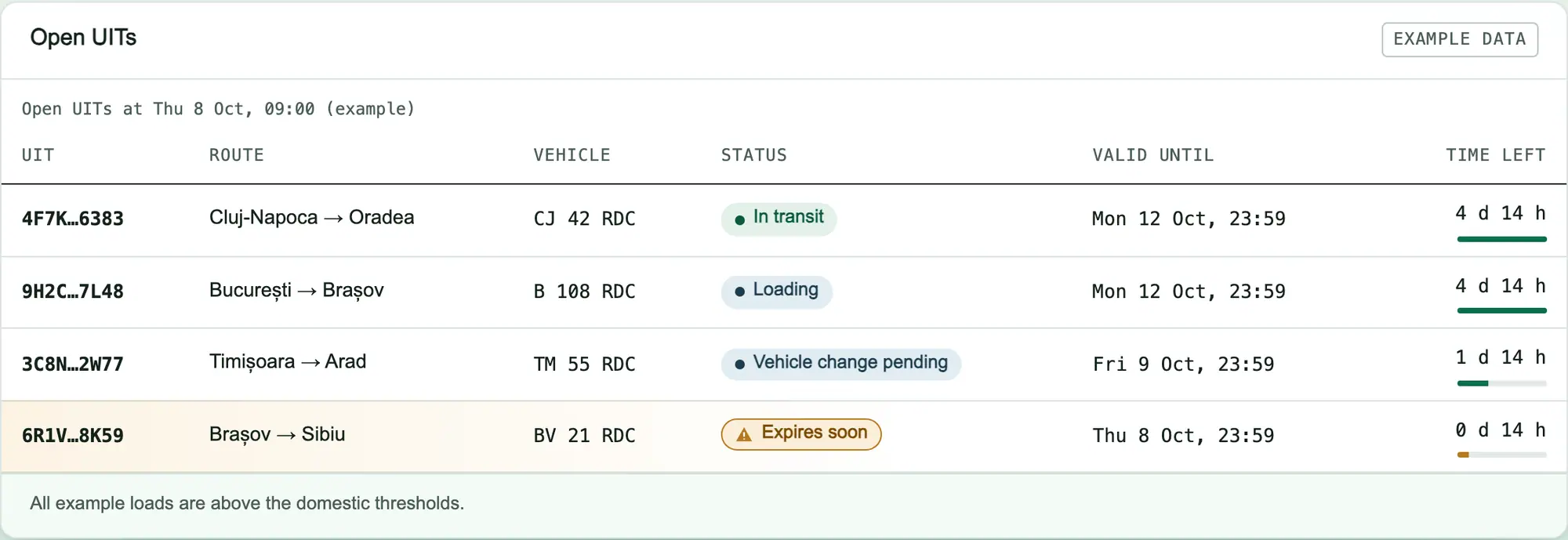
R&D COPILOT lists each open UIT with the time left until it expires, so dispatch can see which loads must arrive or be updated first.

Status: In transit

At this stop

  • Open UITs listed with the time left until expiry
  • Who sends GPS data, per carrier
  • Expiry alerts for open UITs, configured at setup

Open UITs

Example data
Open UITs at Thu 8 Oct, 09:00 (example)
UITRouteVehicleStatusValid untilTime left
4F7K…6383 Cluj-Napoca → Oradea CJ 42 RDC In transit Mon 12 Oct, 23:59 4 d 14 h
9H2C…7L48 București → Brașov B 108 RDC Loading Mon 12 Oct, 23:59 4 d 14 h
3C8N…2W77 Timișoara → Arad TM 55 RDC Vehicle change pending Fri 9 Oct, 23:59 1 d 14 h
6R1V…8K59 Brașov → Sibiu BV 21 RDC Expires soon Thu 8 Oct, 23:59 0 d 14 h

All example loads are above the domestic thresholds.

[ 05 · DELIVERED ]

Close the delivery record in one place.

When the goods arrive, the delivery is confirmed and the record is closed in R&D COPILOT.

How it works

If only part of the load was received, or the goods come back, the reviewer sends a partial confirmation or rejection to RO e‑Transport before the UIT expires. Without one, ANAF treats the transport as confirmed. The declaration, its corrections, the UIT and the ANAF responses stay together for your accountant and any later check.

Status: Delivered

At this stop

  • Delivery confirmed, record closed in R&D COPILOT
  • Corrections kept with the delivery
  • Ready for your accountant

Delivery record LIV-2026-01842

Example data

Same example load as the open UITs table above, later that day, after delivery.

  1. Order confirmed
  2. Declaration prepared
  3. Reviewed and sent
  4. UIT received, accepted
  5. Loaded, vehicle confirmed
  6. In transit
  7. Delivered
  8. Closed in your R&D COPILOT record

Kept with the delivery

  • e‑Transport declaration
  • Official response
  • Transport document AV-1042

Partial confirmation or rejection is sent here when needed, before the UIT expires.

[ DETOUR ]

Plans change on the road. The record keeps up.

UIT 3C8N…2W77 · Timișoara → Arad · example

Vehicle change

Before
TM 55 RDC
After
TM 58 RDC

Local: approvedANAF: processing

Breakdown or trailer swap: the new plate is recorded on the delivery, approved, then sent against the same UIT.

Potatoes · correction 1 · example

Correction or deletion

Before
400 kg
After
450 kg

Waiting for review16 → 18 packages

Fix the delivery and the corrected declaration goes through the same review. Before departure anything can change; after it, only the vehicle.

UIT 4F7K…6383 · at delivery · example

Return

Declared
40 pkg
Received
34 pkg

Partial confirmation6 returned

Goods refused at delivery go back on the same UIT, confirmed in part before it expires. A return after receipt starts a new declaration.

[ WHO DOES WHAT ]

The declarant registers the load. The carrier carries the code.

Declarant (supplier, buyer or importer)

Who declares depends on the operation: the supplier for domestic sales and intra-community deliveries, the Romanian buyer for intra-community acquisitions, the importer or exporter on the customs declaration.

  • Prepares the declaration from the delivery
  • Gets the UIT before the goods leave
  • Gives the UIT to the carrier before the truck moves
  • Records corrections and vehicle changes
  • Confirms, partially confirms or rejects the transport after delivery

Carrier

  • Receives the UIT with the transport documents
  • Uses the declared vehicle, or reports a change
  • Sends GPS position data during transport
  • Shows the UIT at an ANAF, customs or police check

Inside your company: dispatcher and reviewer

The dispatcher prepares; a colleague with ANAF access reviews and sends. We set up access per person with you, so no one is asked for a shared login.

If you are both declarant and carrier, both columns live in one workspace.

[ IN THE APP ]

See the screens your dispatch team uses.

Dispatch sheet for the Cluj-Napoca to Oradea route: apples and potatoes, 40 packages and 700 kg gross, vehicle CJ 42 RDC entered and all four readiness checks complete.

Prepare: the declaration starts from the delivery.

  1. Route and loading points, taken from the delivery
  2. Gross weight totalled per load, checked against the threshold
  3. Readiness checks before the review

e‑Transport · Example dataView full screen

[ SAVED DATA & CONNECTIONS ]

Type it once. Reuse it on every load.

  • Vehicles and trailers

    plates, maximum technically permissible mass, usual carrier

  • Carriers

    name, tax ID, country, who sends GPS data

  • Goods

    name, NC code, unit, usual gross weight

  • Places

    loading and unloading addresses, border crossing points and customs offices for international loads

First load of your data from your current ERP or TMS through an integration, or from an Excel or CSV export agreed at setup.

[ ACCESS ]

Your ANAF access stays yours.

SPV and digital certificate

Declarations go through your company’s SPV access and the official ANAF API, with a qualified digital certificate enrolled for your company. We configure it with you; we never ask for a shared login.

Power of attorney (împuternicire)

If the person sending does not hold the company certificate, an împuternicire registered in SPV lets them act for the company. We list what is needed during setup.

Roles in R&D COPILOT

Who prepares, who reviews and sends, and who only reads, for example finance. We agree the roles with you and configure them at setup.

Three working commitments

  1. A person reviews every declaration.

    The workflow never sends without an authorised approval.

  2. Hosted in the EU.

    Your delivery and transport data is stored in the European Union.

  3. Support in Romanian or English.

    Questions about your workflow are answered by the R&D COPILOT team.

[ SETUP & PRICING ]

From first call to first UIT, in four steps.

  1. Scope

    We go through your goods, routes, operation types and who sends what, with your specialist.

  2. Connect

    We connect your deliveries (R&D COPILOT ERP, your own system or a file export agreed at setup), set up ANAF API access through your SPV, and roles.

  3. Pilot loads

    Your team runs real deliveries through the workflow with us beside them.

  4. Go live

    Everyone uses it day to day; we stay available for changes to your routes, goods or team.

ONCE

One-off setup

Scope, connections, access, first load of your data and pilot. Quoted after the first call.

EVERY MONTH

Monthly licence

The workflow, EU hosting, updates when the ANAF schema or rules change, and support in Romanian or English.

We send a written quote once we know your volumes and connections. No public price list.

Request a quote

[ GOOD TO KNOW ]

Questions dispatch teams ask.

How long is a UIT valid?

5 calendar days from the declared start of transport. It is 15 calendar days for intra-community acquisitions, intra-community transit goods entering Romania for storage or a new load, non-transfers and call-off stock. A UIT may not be used after it expires. R&D COPILOT shows the time left on every open UIT.

How early can we declare?

At most 3 calendar days before the declared start date, and at the latest before the truck moves. For incoming goods, the deadline is the border crossing point or the place of import. During setup we can add a check that flags deliveries close to departure that have no UIT.

Who sends the GPS position data?

The road carrier, for the whole journey: either from the truck’s own tracking device, with the UIT assigned to it before departure, or from a phone running the official Ministry of Finance app. If you carry the goods in your own trucks, that is you. Missing position data can cost the carrier 20,000 lei to 100,000 lei. R&D COPILOT records which carrier is responsible for each UIT; we do not supply GPS devices.

What if the truck changes on the way?

Record the new truck or trailer on the delivery before it moves again. After review, the vehicle change is sent for the same UIT, as the rules require, and the local and official outcomes are shown separately until ANAF confirms it.

Can we correct or delete a declaration?

Yes. Before the truck moves, you can correct anything and keep the same UIT. After it moves, only the vehicle can change. Once the UIT has expired, goods, quantities and value can be corrected until the 25th of the following month. A cancelled transport can be deleted. Each correction is prepared from the delivery and goes through the same review.

Do we need a digital certificate?

Yes. Declarations go through your company’s SPV access through the official ANAF API. That uses a qualified digital certificate enrolled in SPV for your company, held by the legal representative or by an authorised person such as your accountant with an împuternicire registered in SPV.

What happens if a load moves without a UIT?

For a company, fines of 20,000 lei to 100,000 lei. A repeat offence within 12 months also brings confiscation of 15% of the value of the undeclared goods, then 50%, then 100%. During setup we can add a check so a delivery that needs a UIT is flagged before it is marked as dispatched.

Which transports don’t need a UIT?

Excise goods moving under EMCS with an e-DA or e-DAS, postal parcels (up to 31.5 kg) carried by authorised postal service providers, and goods for diplomatic missions or allied armed forces. During setup we mark these on your goods and routes so the workflow skips them.

Can we start without the R&D COPILOT ERP?

Yes. We take deliveries from your current ERP or TMS through an integration, or from an Excel or CSV export agreed at setup, and the UIT is written back to the delivery.
[ GUIDES ]

Guides for your workflow

[ DESTINATION ]

Let’s map your first route.

Tell us what you ship, how often and from which system. We reply in English or Romanian with the next steps.